


Invitation Card Maker & Invite
3.32.00 Reviews
App Specs
- Version
- 1.2.6
- Updated On
- License
- Free
- Downloads
- 500,000+
- Developer
- SoftAxes
- Categories
- Events
- Platform
- Android
Screenshots

 Analysis by AppCompare
I often want an invitation to feel personal without turning a simple get-together into a design project. A phone-based card maker can be useful for exactly that: it gives me a place to shape the look of an invite before I share it. Invitation Card Maker & Invite is aimed at occasions such as birthdays, weddings and anniversaries, and its appeal is the chance to make a card that feels more considered than a plain message.
What to expect from the pace
I’d approach this as a lightweight creative task, not as a professional desktop design suite. The idea is to choose a starting point, adjust it, and prepare an invitation; how quickly that feels will depend on how much detail you want to add and how comfortable you are making design choices on a small screen. For a straightforward birthday card, I’d keep the text and visual changes focused rather than spending time trying every possible combination.
That distinction matters if you’re in a rush. A template can give you a head start, but choosing a suitable style and checking the finished wording still take attention. I’d set aside a few calm minutes rather than opening the app as guests are already asking where the party is. The best time-saver is deciding the event details first, so you are not switching back and forth between the design and your notes.
When you’re making more than one invitation
The heavier moments are likely to be the ones where the same event needs several rounds of changes: adjusting the wording, comparing different looks, or preparing a digital version and a paper copy. I’d settle the practical details—date, place, and any reply instructions—before concentrating on decoration. That reduces the chance of polishing a design and then having to revisit it because the essential information changed.
For a family gathering, for example, I might make the central details easy to spot and treat decorative touches as secondary. A guest reading an invitation quickly on a phone should not have to hunt for the time or location. If I were preparing a printed card as well, I’d inspect the layout at its final size before making copies; a design that feels balanced on a display may not read as comfortably on paper.
Reliability and a sensible workflow
I would treat the invitation as a small project with a clear checkpoint: review the text and overall appearance before sharing it. That simple pause is useful with any card-making tool, especially when names, dates, and addresses are involved. It also helps avoid an avoidable round of corrections after the invite has already gone out.
For an important event, I would keep the event details somewhere easy to check while designing and avoid leaving the only copy of the information inside an unfinished draft. If the design process is interrupted, having the wording ready lets me pick up the task without reconstructing the details from memory. I’d also make sure the final card is saved or shared in the way I actually need before closing out of the task.
Worth Reading Before You Choose

Flipboard Shows What News Apps Must Do Beyond the Feed

Switching to Android Auto Means Rethinking Your Driving Routine

Google Calendar Makes a Crowded Week Easier to Manage

Ludo King Makes the Most of the Minutes Between Plans

Baby Panda World Brings Quick Play to Modern Phones, but Its Game Library Feels Busy

ESPN’s Live Game View Makes Following Close Games Easier
Device fit and where another tool may suit better
This is an events app from SoftAxes, and it is free to install, with optional in-app purchases priced at $1.99 per item. It has an Everyone age rating, a 3.3 average from 589 ratings, and more than 500,000 installs. Version 1.2.6 requires Android 7.0 or later. Those details make it approachable for many Android users, though they do not tell me how it will feel on every individual phone.
On a smaller display, I’d favor shorter wording and a clean layout, since long blocks of text are harder to judge while arranging a card. If I need exact print production, extensive typography controls, or a carefully managed invitation campaign, I’d lean toward a desktop design program or a dedicated event-planning service instead. A simple messaging app is also quicker when all I need is to tell a few friends the time and place, but it offers less of a designed-card experience.
First Impressions
When I first launched the Invitation Card Maker & Invite app, I was greeted with a sleek and intuitive interface. It's got this vibrant vibe that immediately puts you in the party spirit. The app's design is user-friendly, making it easy to dive right in without any fuss. No need to be a tech wizard here—the app does a great job of keeping things straightforward.
Creating Your First Invite
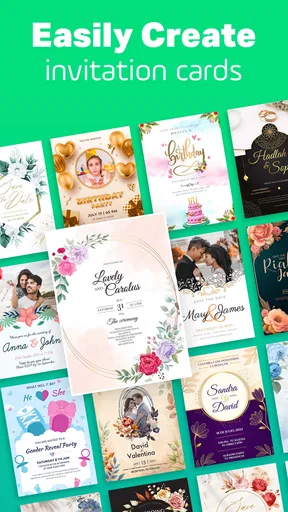
The real magic happens when you start creating your first invite. You can either start from scratch or choose from a plethora of templates. Trust me, the options are plentiful, and they cover pretty much every occasion you can think of. From birthday parties to weddings, there's something for everyone.
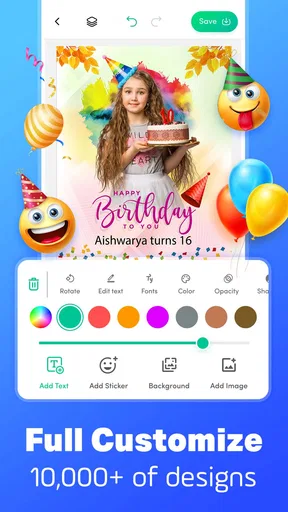
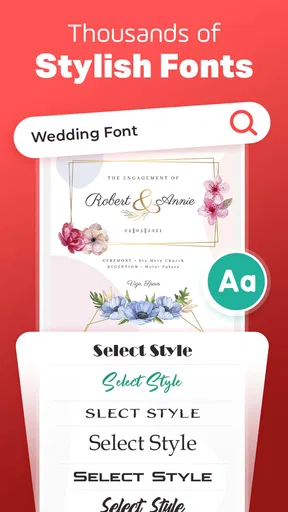
One of the things I loved is how customizable the templates are. You can tweak colors, fonts, and even add your own images. The drag-and-drop functionality makes it super easy to personalize your invitation without any design skills. I spent a good amount of time just playing around with different combinations—it’s a bit addictive!
Features Worth Mentioning
Aside from the ease of use, the app is packed with features that make it stand out. For instance, you can add RSVP options directly to your invites, which is a neat touch. It’s so convenient to have everything in one place, and it saves you the hassle of tracking responses manually.
Another highlight is the option to send your invites digitally or print them out. You can share them via email, social media, or even a messaging app of your choice. If you're old-school like me and love the feel of paper, the print option is a godsend. The app ensures that the printed version looks just as good as the digital one.
Why I’m a Fan
What really sold me on this app is its ability to make a daunting task feel fun and creative. It takes the pressure off planning and lets you focus on the fun stuff. Plus, the professional look of the invites can seriously impress your guests. I’ve received numerous compliments on the invites I created, and it’s all thanks to the app.
Getting the Most Out of It
To truly make the most of this app, I recommend exploring all the customization options. Don’t be afraid to experiment with different styles and layouts. The app also offers additional design packs if you’re looking for something extra special. These can be a worthy investment if you’re planning multiple events or want to keep things fresh.
Who will get the most from it
I can see this being most useful for someone who wants a visual invitation but doesn’t want to learn a full design tool. A parent organizing a child’s birthday, a couple planning a small celebration, or a friend coordinating a casual dinner can start with a card and make it feel personal. The templates are a practical shortcut: they give you a structure to work from, while the option to adjust the look and add an image helps the result feel less generic.
It is less compelling if your invitation needs to behave like a complete event-management system. A designed card and an RSVP prompt can help keep communication together, but I would not assume that they replace a guest list, reminders, seating plans, or a reliable record of every response. For a large event where several people need to coordinate, a shared planning tool may be a better home for logistics, with the card maker used only for the visual invitation.
A realistic way to use it
Imagine I’m arranging a weekend birthday lunch and want relatives to have the details in one attractive image. I’d choose a fitting template, add the event information, and keep the wording brief enough to read at a glance. Then I’d adjust the colors and image only after the date, time, and location are settled. Before sharing, I’d check the invite on my phone as a recipient might see it, especially whether the key information remains legible in a message thread.
If some guests prefer paper, I’d treat the print version as a separate check rather than assuming the screen preview settles everything. I’d look for small text, crowded edges, and any details that might become hard to read when printed. That extra review is a modest trade-off for using one design across digital and physical sharing, and it is more useful than endlessly tweaking decorative elements.
Choosing between templates and starting fresh
Templates are likely the sensible first move when I need a recognizable invitation quickly. They can help with visual hierarchy: the event title can stand out, while the practical details sit in a supporting role. Starting from scratch makes more sense when I already have a clear visual idea or want a less familiar look, but it also gives me more decisions to make. I would not begin from a blank design just to prove I can; the finished card matters more than the route taken to get there.
A useful small-screen habit is to write the message before styling it. Keeping the copy concise gives the design room to breathe and makes it easier to compare fonts and colors without the text itself changing at the same time. For an invite that will be forwarded, I’d also make sure it contains enough context to stand alone, rather than relying on a separate explanation that might not travel with the image.
What the rating and paid extras mean in practice
The app’s average rating is 3.3, based on 589 ratings, so I’d go in with measured expectations rather than assuming every part of the experience will suit me. That score does not tell me which specific issue another person encountered, but it is a fair reason to try a simple design before depending on the app for a time-sensitive, high-stakes event. The app is free, and optional purchases cost $1.99 per item; I’d first see whether the available design choices meet my needs before paying for extras.
The extra design packs are most worth considering when I have a real reason to use them, such as wanting a particular look for a special occasion or expecting to make invitations repeatedly. If I only need one basic card, I would not treat a purchase as essential. The practical question is whether an added style improves the invitation enough to justify the expense, not whether more choices are automatically better.
Performance verdict
For occasional invitations, I’d judge this app by how easily it helps me get from an idea to a clear, shareable card. Its focus on templates and personal touches suits casual event planning, and the digital and print options make it more flexible than sending plain text alone. I’d still take a moment to proofread and check the final layout, particularly when the details matter or the card will be printed.
My overall view is that it makes sense for people who enjoy adding a bit of style to an invitation without turning the job into a major project. It is not the tool I’d choose for intricate print work or complex guest coordination, and I’d keep expectations realistic when relying on it for a deadline. But for a birthday, anniversary, or get-together where a personal card is the goal, Invitation Card Maker & Invite is an approachable place to start.
Pros
- User-friendly interface for easy navigation.
- Wide range of templates available.
- Customizable fonts and colors.
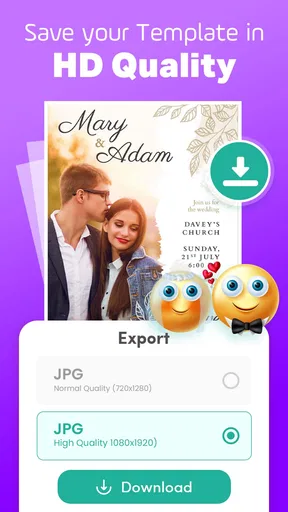
- Supports high-resolution exports.
- No watermark on final designs.
Cons
- Limited free features without upgrade.
- Occasional ads can interrupt workflow.
- Requires internet for template access.
- Some templates may seem outdated.
- No direct social media sharing integration.
FAQs for Invitation Card Maker & Invite
What customization options are available in Invitation Card Maker & Invite?
Invitation Card Maker & Invite offers a wide range of customization options, allowing users to personalize their invitations with various templates, fonts, colors, and images. You can also add personal photos and adjust text size and alignment to suit your event’s theme, making it easy to create a unique and memorable invitation.
Is the Invitation Card Maker & Invite app free to use?
The app offers both free and premium features. While you can access a variety of basic templates and tools for free, unlocking advanced designs and additional customization options may require a subscription or one-time purchase. This allows users to choose the level of investment based on their needs.
Can I share my invitations directly from the app?
Yes, the Invitation Card Maker & Invite app allows you to share your invitations directly through various platforms. You can send them via email, social media, or messaging apps. This seamless sharing functionality ensures that your invitations reach your guests quickly and conveniently.
Is the app suitable for all types of events?
Absolutely! The Invitation Card Maker & Invite app is designed to cater to a wide range of events, including birthdays, weddings, baby showers, and corporate events. With customizable templates and themes, you can create invitations that perfectly match the tone and style of any occasion.
Does the app require an internet connection to function?
While you can access many features offline, an internet connection is necessary to download new templates, access premium content, and share invitations. This ensures you have the latest design options and can easily distribute invites to your guests when ready.


